INSWAN
INSWAN INS‑2 4K USB Document Camera – 13MP, Dual Auto‑Focus, LED Light and Microphone, Plug & Play, Mac, Windows, iPad, Chromebook, A3 Capture – Ideal for Teachers and Classrooms
INSWAN INS‑2 4K USB Document Camera – 13MP, Dual Auto‑Focus, LED Light and Microphone, Plug & Play, Mac, Windows, iPad, Chromebook, A3 Capture – Ideal for Teachers and Classrooms
Couldn't load pickup availability
HIGH-RESOLUTION. LARGE-FORMAT CAPTURE: Capture clear 4K Ultra HD images (3840 x 2160 @ 30fps) with the 13MP SONY sensor. The multi-joint arm allows flexible angle adjustments for documents up to A3 size.
PROFESSIONAL PERFORMANCE FEATURES: Built-in LED light. anti-glare sheet. dual-mode autofocus. brightness control. macro capability (as close as 3.9 inches). and built-in mic deliver clear and professional presentations.
ALL-IN-ONE DOCUMATE SOFTWARE: Documate offers zoom. annotation. video recording/scanning. whiteboard tools. and OCR for enhanced teaching. Download the latest version for free on our website.
PLUG-AND-PLAY COMPATIBILITY: Instant UVC plug-and-play with (Windows 7/8/10/11). Mac (OS 13.5+). iPad (OS 17+; must have a USB-C port) and Chromebook (38.0+)—works seamlessly with Zoom. Microsoft Teams. Google Meet. and more. Designed and Made in Taiwan.
The INSWAN INS-2 Document Camera captures 4K images with a 13MP sensor. A3-size viewing area. compact design. creative Documate software features. and seamless plug-and-play. Elevate your visual experience effortlessly for engaging teaching and meetings.
Discover our Supplemental LED Light with Automated Exposure Control!
Experience Crystal Clear Audio with the Built-in Stereo Microphone - Perfect for Web Conferencing and Online Teaching!
- Single: Keeps still objects clear. reduces blur from hand movements.
- Continuous: Automatically tracks moving objects. ensures smooth focus transitions.
The multi-joint arm allows flexible angles. a wider capture range. and effortless adjustments for smooth presentations.
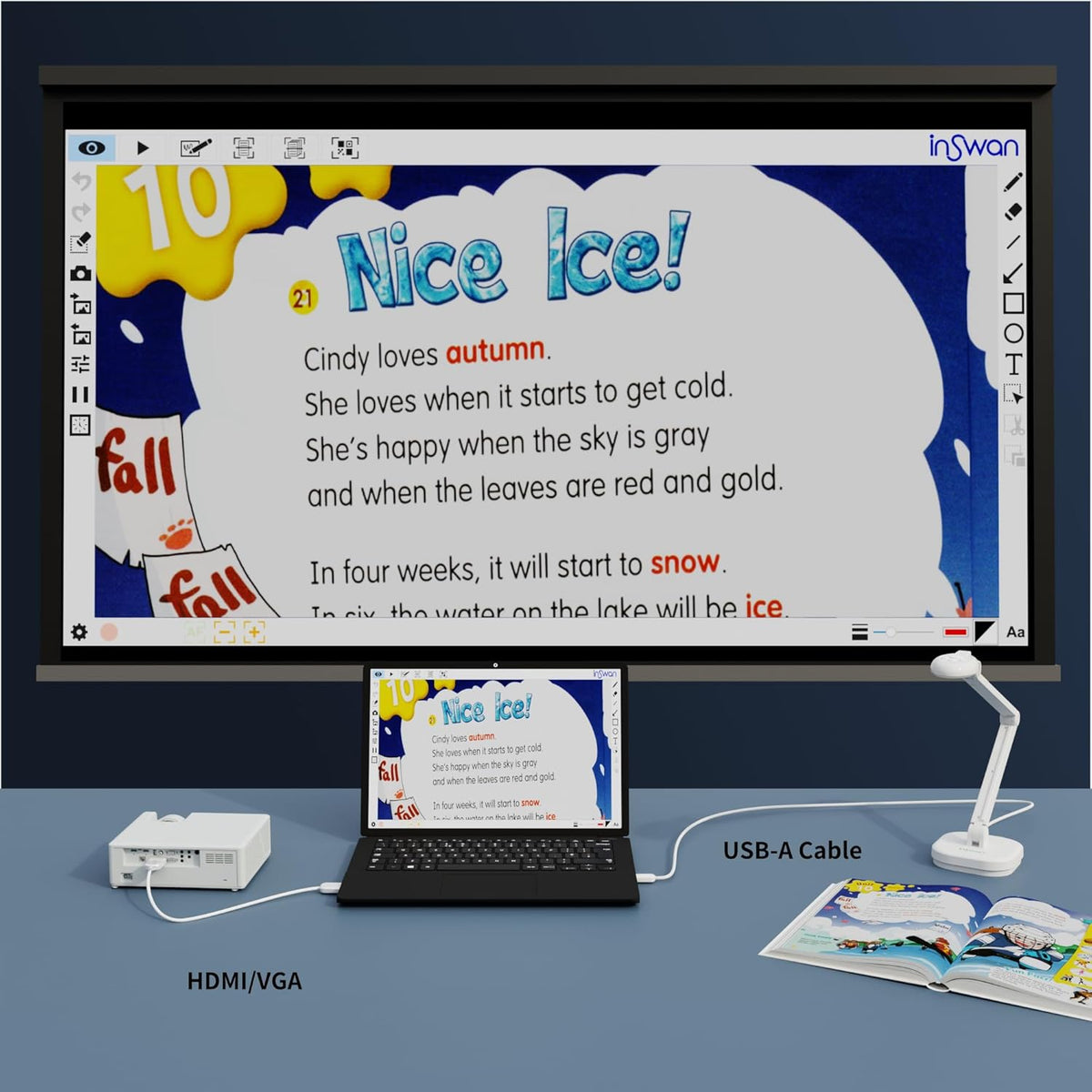
Can I use the INSWAN USB document camera to project directly to a TV or projector without connecting it to a computer?
As the camera requires a computer or laptop to process and display the image. It's necessary to connect the INSWAN INS-2 to a computer/laptop first via USB. Then. connect the computer or laptop to the screen or projector via a VGA or HDMI cable.
Does the INSWAN document camera support iPads?
Yes. as long as:
- USB-C iPad with iPadOS 17+ required (no Lightning models).
- iPadOS 18+ is needed to install and fully use Documate app.
- Camera uses a USB-A connector. a USB-C to A adapter is required.
- Search “Inswan Documate” in App Store.
How can I shoot 1080P / 2160P high-definition live video and fix image mirroring?
Some webinar app mirrors images at host end and drop image resolution by default.
Solve by:
1.Plug in INS-2 document camera
2.Launch any webinar software/Documate to display the live image
3.Simultaneously press brightness +/- buttons to flip image
How can I capture static and moving images clearly with the INSWAN INS-2 document camera?
The INSWAN INS-2 documents camera comes with dual mode. Switch to single mode to capture static objects (To avoid refocus interference while your hands are moving. choose this mode). Select continuous mode to easily capture clear moving images!
Enhance Teaching and Business Presentations with INSWAN INS-2 4K Document Camera
Perfect for Big Screen
Perfect for two-page spreads and large documents
Capture everything in details with macro function
Use INS-2 in everywhere
Seamless UVC Camera Compatibility-USB 2.0 (Type A)
INSWAN INS-2 Document Camera ─ Your All-In-One Solution!
Supplemental LED Light
Built-in Microphone
Dual Mode AutoFocus
Multi-Joint Arm
Dual-Mode Autofocus allow you to capture crisp image in any conditions
Static focus stays on point:
Inswan Ins-2 auto-focus single
Exclusive Documate Software Brings In-Person/Online Presentation Come to life!
How is INSWAN INS-2 document camera different from other devices?
Can I use the INSWAN USB document camera to project directly to a TV or projector without connecting it to a computer?
Does the INSWAN document camera support iPads?
How can I shoot 1080P / 2160P high-definition live video and fix image mirroring?
How can I capture static and moving images clearly with the INSWAN INS-2 document camera?
Share