We Technology
Smart Door Lock with Camera: 3D Face Recognition, Keyless Biometric Door Lock with Fingerprint, Passcode, IC Card, Mechanical Key, Doorbell, WiShome App, Auto-Lock, Front Door Lock
Smart Door Lock with Camera: 3D Face Recognition, Keyless Biometric Door Lock with Fingerprint, Passcode, IC Card, Mechanical Key, Doorbell, WiShome App, Auto-Lock, Front Door Lock
Couldn't load pickup availability
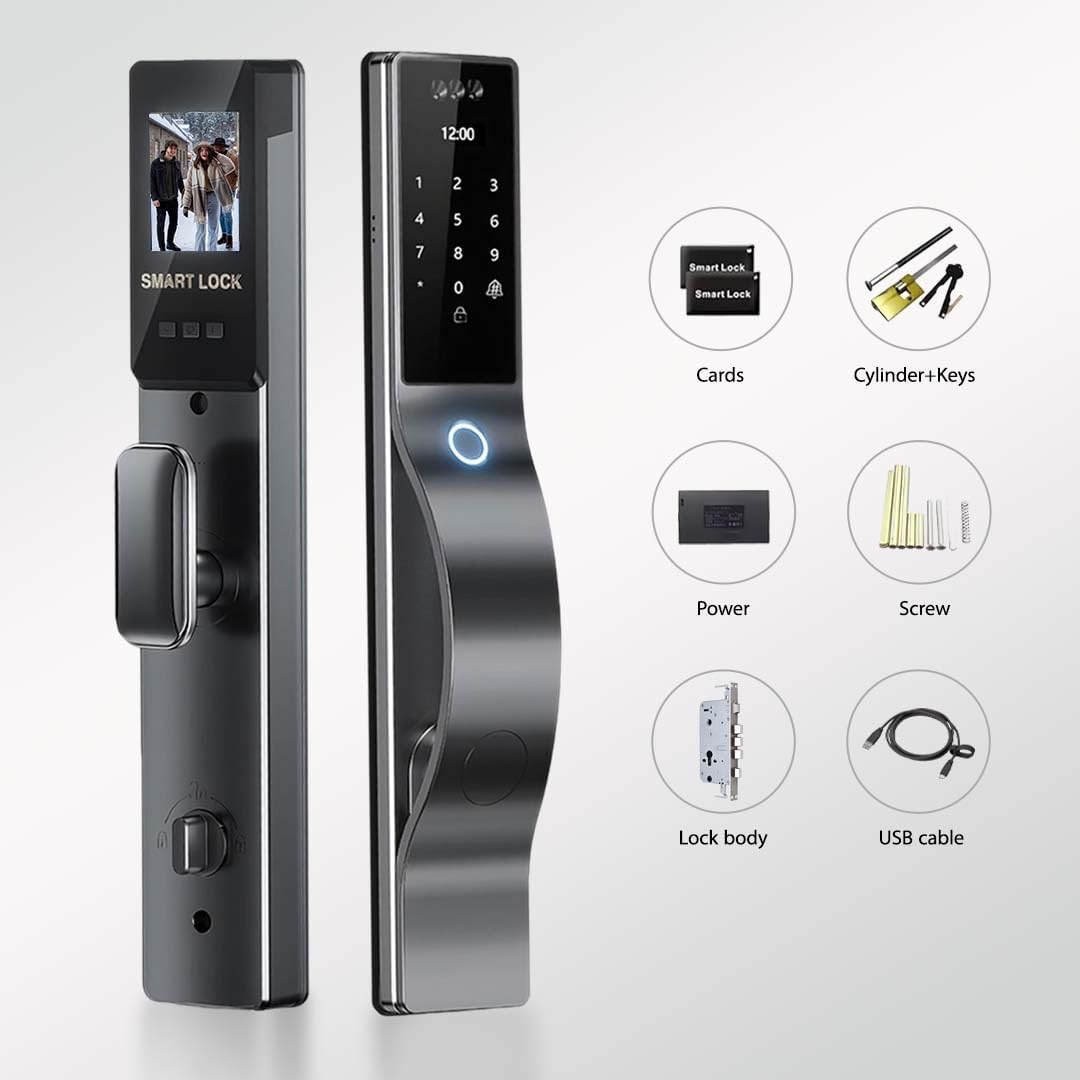
6 FLEXIBLE WAYS TO UNLOCK – PERFECT FOR THE WHOLE FAMILY Choose what works for you: 3D Face ID. Fingerprint. Secure Passcode (with anti-peep protection). IC Cards. Emergency Mechanical Key. or WiShome App. Give kids fingerprint access. share temporary codes for guests. or use your phone – total control for every situation.
Built-in HD camera with night vision lets you see who's at your door in real time. Use the WiShome app to see live video. answer the doorbell with two-way audio. and never miss a delivery or visitor – whether you're upstairs or on vacation.
SMART AUTO-LOCK WITH MILITARY-GRADE SECURITY Door locks itself automatically after every entry or exit – never worry about forgetting again. Built with aerospace-grade aluminum alloy. reinforced ABS back panel. and heavy-duty 6068 mortise lock body. Resists drilling. tampering. and physical attacks for complete peace of mind.
LONG BATTERY LIFE WITH EMERGENCY TYPE-C POWER 3200mAh rechargeable lithium battery lasts for months on a single charge. Low on power? Plug any USB-C cable into the emergency port for instant backup power. No lockouts. no stress. no hardwiring needed.
DIY- Installs in Minutes. No Tools Needed Fits doors 45–90mm thick with quick. simple installation. No drilling. No wiring. Just a seamless upgrade to a smarter lifestyle — all by yourself.
Total Control. Total Peace of Mind
Face Recognition FeatureMultiple User Access
Act Now: Avoid a Lockout Emergency: Recharge Your Smart Lock
Red Alert: The Dangers of Faulty Fingerprint Recognition. When Biometrics Fail: The Importance of Security
How to change the Motor Direction?
press 888#.in factory reset or
Enter Intial Admin Password "*"."#" 123456 then "#" . press "3" Install
then Press "1" Motor Dir then Select (1 foreward or 2 reverse) to change the direction of the Lock acc to actual opening direction.
How to change the device language (User Interface) ?
To change the language. Enter Intial Admin Password "*"."#" 123456 then "#" . press "1" Local Setting. "3" option then press "3" Language Setting then Select "2" for English
How to Check the Status of your Network Connection to link the Lock to App (If you have a problem with the connection)?
- Turn on mobile Wi-Fi and Bluetooth
-WIFI 2.4G. not 5G or others
- Take the Smart lock near to the router
If above does not work. reset the router. or use another mobile to connect
Smart Door Lock with Multiple Access
Random Digit Password
Accurate Biometric Access
Effortless Access with IC Card
Trusted Security. Key in Hand
Smart Door. Smart Life
Sleek Design. Unlimited Access
Upgrade your Home Security with Smart Door Lock
Low Battery Alert!
Security Safeguard
Peace of Mind Starts at Your Fingertips: One Lock Smart Control
Automated Door Lock
How do you get the User Guide for Configuration and Installation or Template Diagram?
How to change the Motor Direction?
How to change the device language (User Interface) ?
How to Check the Status of your Network Connection to link the Lock to App (If you have a problem with the connection)?
Share